
Kubernetes interview questions changed shape once nearly every candidate had a certification or a home lab. "What is a Pod?" no longer tells an interviewer anything. "Your Pod has been Pending for ten minutes, what do you check first?" tells them a great deal, because the answer depends on knowing how the scheduler, the kubelet and the control loop actually decide things.
That is the thread through this whole article. Kubernetes behaves predictably once you know which component makes which decision, and the interview is mostly a test of whether you can walk from a symptom back to that decision. Five areas cover almost all of it:
- Architecture and the control loop - who decides what, and why the cluster converges
- Workloads, rollouts and probes - Deployments, rolling updates, and the probe that restarts things it should not
- Scheduling, resources and autoscaling - requests, limits, QoS, and what the autoscalers actually measure
- Services and networking - how traffic finds a Pod, and why everything can talk to everything by default
- Config, storage, security and troubleshooting - Secrets, volumes, RBAC, and reading a broken Pod's status
Most people know two or three of these well and bluff the rest. The quiz below tells you which.
Start here: a 6-question self-check
Six questions from the Kubernetes set on squizzu, at least one per area. Networking gets two, because that is where most people's picture of the cluster is thinnest. Each answer shows the reasoning immediately, with a longer breakdown underneath, and nothing asks you to sign up.

Resources and security defaults trip up people who have run clusters for years. On resources, plenty of people who write manifests every day cannot say how requests decide which Pod the kubelet evicts when a node runs out of memory. On security, Kubernetes is far more permissive out of the box than most people assume, and the NetworkPolicy question is the one that shows it. If either surprised you, read areas 3 and 4 first.
What a Kubernetes interview looks like
Kubernetes rarely gets a round of its own. It shows up inside DevOps, SRE, platform and backend loops in three forms.
Rapid-fire fundamentals. A handful of short questions early in a technical screen: the difference between a Deployment and a StatefulSet, what a Service does, what happens when a node dies. These are filters, and a hesitant answer costs more than it should.
The troubleshooting scenario. You are given a symptom and asked to debug it out loud: a Pod stuck in Pending, a rollout that never completes, a Service that returns connection refused. This is where most of the signal comes from, because it cannot be answered from memorised definitions.
The design discussion. How would you run this service on Kubernetes? What would the manifests look like, how would it scale, how would you roll it out safely, what would you monitor? In 2026 this increasingly includes GPU workloads and cost, since oversized requests on expensive nodes became a line item that someone gets asked about.
A few ecosystem changes are worth knowing because they come up as "what has changed recently" questions. The community ingress-nginx controller reached end of life in March 2026, which pushed many teams onto Gateway API. In-place Pod resize, changing a running Pod's CPU and memory without recreating it, became stable in Kubernetes 1.35. And Dynamic Resource Allocation went GA in 1.34, giving GPUs and other devices a proper scheduling model instead of a simple counter.
Area 1: Architecture and the control loop
Kubernetes is a set of controllers that each compare the desired state of some objects with the actual state of the world and act to close the gap. Once that clicks, most of the architecture questions answer themselves.
The components and their single jobs:
| Component | Where it runs | What it decides |
|---|---|---|
| API server | control plane | validates and stores every object; the only component that talks to etcd |
| etcd | control plane | the key-value store holding the cluster's entire state |
| Scheduler | control plane | which node a new Pod should run on |
| Controller manager | control plane | runs the controllers: Deployments create ReplicaSets, ReplicaSets create Pods |
| kubelet | every node | starts and watches the containers of Pods assigned to its node |
| kube-proxy | every node | programs the node's rules so Service IPs reach Pod IPs |
The question interviewers use to test the model is some version of "walk me through what happens when you run kubectl apply on a Deployment." A strong answer follows the objects. The API server stores the Deployment. The Deployment controller notices it and creates a ReplicaSet. The ReplicaSet controller creates Pod objects with no node assigned. The scheduler picks a node for each and writes the choice back. The kubelet on that node sees a Pod assigned to it, pulls the image and starts the containers. No component calls another directly; each one watches the API server and reacts.
Interviewers usually follow up on what this implies. First, the system is level-triggered: if you delete a Pod that a ReplicaSet owns, the controller sees three Pods where it wants four and creates a replacement. That is self-healing, and it is also why deleting a misbehaving Pod is not a fix. Second, etcd is the cluster's single source of truth, so losing it without a backup means losing the cluster's state, even though the running containers keep going for a while.
What the interviewer is testing: whether you can reason about which component owns a failure. Common follow-up: "What happens to running Pods if the control plane goes down?" They keep running. The kubelets keep managing their containers; what stops is anything that needs a decision, such as scheduling new Pods or replacing failed ones.
Area 2: Workloads, rollouts and probes
A Pod is one or more containers that share a network namespace and volumes, scheduled together onto one node. You rarely create Pods directly. A Deployment manages stateless replicas through ReplicaSets and handles rollouts; a StatefulSet gives each replica a stable name and its own persistent volume, which is what databases and message brokers need; a DaemonSet runs one Pod per node, which is how log collectors and node agents are deployed; a Job runs Pods to completion.
Rolling updates are where people get vague. When a Deployment's Pod template changes, the controller creates a new ReplicaSet and shifts replicas from old to new. Two settings govern the pace: maxSurge, how many extra Pods may exist above the desired count, and maxUnavailable, how many may be missing. Both default to 25%. Setting maxUnavailable: 0 with a positive surge means capacity never drops during a rollout, at the cost of needing spare room in the cluster for the extra Pods.
What actually gates a rollout is readiness. A new Pod counts as available only once its readiness probe passes, so a version that never becomes ready stalls the rollout instead of replacing every healthy Pod with a broken one. That makes the readiness probe the most important line in the manifest for safe deploys.
The three probes do three different things, and mixing them up is a common and expensive mistake:
- Readiness - failing removes the Pod from its Services' endpoints. The container keeps running and gets traffic back when it recovers.
- Liveness - failing makes the kubelet restart the container. Use it only to detect a process that is wedged and will never recover on its own.
- Startup - holds off the other two until a slow-starting application is up, so liveness does not kill it halfway through boot.
The classic mistake is a liveness probe that checks a dependency, such as the database. When the database has a blip, every Pod fails liveness at the same moment, every container restarts, and a brief dependency problem becomes a full outage with a cold start on top.
What the interviewer is testing: knowing which mechanism protects production during a deploy. Common follow-up: "How do you roll back?" kubectl rollout undo switches back to the previous ReplicaSet, which the Deployment keeps around for exactly this reason.
Area 3: Scheduling, resources and autoscaling
Deploying to Kubernetes and operating it are different jobs, and this area is where the difference shows. The core of it is two fields.
Requests are what the scheduler reserves. A Pod is placed only on a node whose unreserved capacity covers its requests, and the scheduler does not look at actual usage at all. Limits are what gets enforced at runtime, and the enforcement differs by resource:
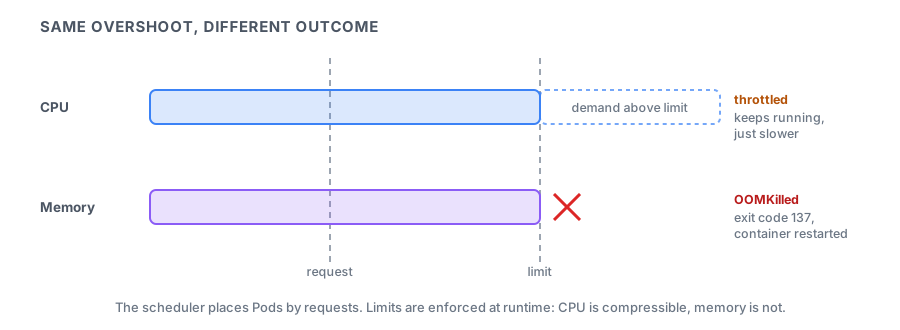
CPU is compressible, so a container over its CPU limit is throttled and simply runs slower. Memory is not, so a container that tries to use more than its memory limit is killed by the kernel's out-of-memory killer and restarted, showing up as OOMKilled with exit code 137. That asymmetry is behind a lot of production advice: many teams set memory limits equal to memory requests, and some leave CPU limits off entirely so that latency-sensitive services are not throttled while the node has idle cores.
Requests and limits together determine a Pod's QoS class, which decides who is evicted first when a node runs short of memory:
| QoS class | Condition | Evicted |
|---|---|---|
| Guaranteed | every container has requests equal to limits for CPU and memory | last |
| Burstable | at least one request or limit set, but not Guaranteed | in between |
| BestEffort | no requests or limits at all | first |
The class is not the whole ranking. Under memory pressure the kubelet also looks at how far each Pod's usage exceeds its requests, and at Pod priority, so a Burstable Pod far above its request can go before one that stayed within it.
Autoscaling comes in three layers, and interviewers like to check that you know what each one measures:
- Horizontal Pod Autoscaler changes the replica count based on a metric. For CPU it computes utilisation as a percentage of the request, so a Deployment without CPU requests gives the HPA nothing to divide by.
- Vertical Pod Autoscaler recommends or applies better requests. With in-place resize now stable, adjusting a running Pod no longer has to mean recreating it.
- Cluster Autoscaler (or Karpenter on AWS) adds nodes when Pods are Pending because their requests fit nowhere, and removes nodes that are underused. It reacts to requests, not to real usage, which is why inflated requests quietly cost money.
What the interviewer is testing: whether you can explain a scheduling or performance symptom from the resource model. Common follow-up: "The node shows 30% CPU usage but new Pods will not schedule. Why?" Because the scheduler counts requests, not usage, and the requests on that node already add up to its capacity.
Area 4: Services and networking
Pods are disposable and their IP addresses change, so nothing should talk to a Pod IP directly. A Service gives a set of Pods a stable virtual IP and DNS name. It selects Pods by label, the endpoint list is kept current as Pods come and go, and kube-proxy programs each node so that traffic to the Service IP is spread across the ready endpoints.
The Service types build on each other:
- ClusterIP - the default, reachable only inside the cluster.
- NodePort - also opens the same port on every node.
- LoadBalancer - also asks the cloud provider for an external load balancer.
- Headless (
clusterIP: None) - no virtual IP at all. DNS returns the Pod IPs directly, which is how StatefulSet members address each other by stable name.
Inside the cluster, a Service is reachable at name.namespace.svc.cluster.local, and from the same namespace just by name. The most common real-world Service bug is a selector that does not match the Pod labels, which produces a Service with no endpoints and connection errors that look like a network problem. kubectl get endpointslices shows it in one line.
For HTTP traffic from outside, Ingress defined host and path routing for years. Gateway API is its successor: it splits the concerns between infrastructure owners (the Gateway) and application teams (Routes), and it standardises features that Ingress controllers used to express as vendor-specific annotations. With the community ingress-nginx controller retired, "have you worked with Gateway API?" is a fair question in 2026.
The networking default that catches people is isolation, or rather its absence. With no NetworkPolicy in place, every Pod can reach every other Pod in every namespace. A Pod becomes isolated only when a NetworkPolicy selects it, and then only the traffic that some policy allows gets through. Policies also require a network plugin that enforces them; on a plugin that does not, they are accepted and silently ignored.
What the interviewer is testing: whether you can trace a request from a client to a container and name each hop. Common follow-up: "The Service exists and the Pods are running, but requests fail. What do you check?" Endpoints first, then readiness, then the port mapping between the Service's targetPort and the container.
Area 5: Config, storage, security and troubleshooting
Configuration goes into ConfigMaps and Secrets, mounted as files or exposed as environment variables. The detail worth knowing is that environment variables are read once at container start, while mounted files are updated when the object changes, so a ConfigMap edit reaches a running application only if it reads files and reloads them.
Secrets are not encrypted by default. Their values are base64-encoded, which anyone can reverse, and stored in etcd as they are. Real protection takes encryption at rest configured on the API server, ideally through a KMS provider, plus RBAC that restricts who can read Secrets. This is one of the most reliable interview questions in the whole topic, because the name suggests more protection than the default provides.
Storage separates the request from the supply. A PersistentVolumeClaim asks for storage of a size and access mode; a StorageClass tells the cluster how to provision it dynamically, for example as a cloud disk; the resulting PersistentVolume is bound to the claim. The access mode question comes up often: ReadWriteOnce means one node can mount the volume read-write, which is what most block storage supports, so two Pods on different nodes cannot share it.
RBAC grants permissions through two pairs of objects. A Role and RoleBinding apply within one namespace. A ClusterRole and ClusterRoleBinding apply cluster-wide and are the only way to grant access to cluster-scoped resources such as Nodes or PersistentVolumes. Pods get their API permissions through a ServiceAccount, and a quick hardening win is making sure containers run as non-root through the Pod's securityContext.
Troubleshooting ties the whole article together, because each Pod status points at a specific component:
| Status | What it means | Where to look |
|---|---|---|
| Pending | the scheduler cannot place it | kubectl describe pod events: insufficient CPU or memory, taints, an unbound PVC |
| ImagePullBackOff | the kubelet cannot pull the image | image name and tag, registry credentials, rate limits |
| CrashLoopBackOff | the container starts and keeps exiting | kubectl logs --previous, exit code, missing config |
| OOMKilled | the container crossed its memory limit | the limit, or a leak |
| Running, not Ready | the readiness probe is failing | the probe definition and the dependency it checks |
What the interviewer is testing: a method. Narrow the problem down to a component; do not just try things until it works. Common follow-up: "kubectl logs shows nothing useful for a crash-looping Pod. Why?" Because by default it shows the current attempt, which has only just started. --previous shows the one that crashed.
How to prepare for a Kubernetes interview in a week
You need a cluster, but not a real one: kind or minikube on a laptop covers every exercise here.
- Day 1 - The control loop. Apply a Deployment and follow it with
kubectl get events --watch. Delete a Pod and watch the ReplicaSet replace it. Then explain the whole sequence out loud without notes. - Day 2 - Rollouts. Roll out a new image with
maxUnavailable: 0. Then roll out one that never becomes ready and watch the rollout stall instead of breaking the service. Undo it. - Day 3 - Probes. Give a Pod a liveness probe that fails after a minute and watch the restarts. Then turn it into a readiness failure and watch the Pod leave the endpoints without restarting.
- Day 4 - Resources. Run one container that burns CPU past its limit and one that allocates memory past its limit. Compare what happens to each, and check which QoS class each Pod received.
- Day 5 - Networking. Break a Service by changing a label on the Pods and find it through the endpoints. Then apply a default-deny NetworkPolicy to a namespace and open just one path.
- Day 6 - Security and storage. Create a Secret and decode it with
base64 -dto see why encoding is not encryption. Write a Role that can read Pods in one namespace, bind it to a ServiceAccount and test it withkubectl auth can-i. - Day 7 - Rehearse. Take each row of the troubleshooting table, recreate that status on purpose, and debug it out loud in under five minutes.
Keep going
Six questions are a sample. The Kubernetes set on squizzu has close to 190, across architecture, workloads, scaling, networking, storage and security.
Work through the Kubernetes questions on squizzu. The explanations cover the wrong options too, and for troubleshooting that is the useful half: knowing why the plausible status is not the right one.
Most clusters run images someone had to build first, so the Docker quiz covers the layer underneath, and DevOps interview questions for 2026 follows those images through the pipeline and the rollout that bring them to the cluster. If your loop also includes an architecture round, our system design interview guide covers the scaling, caching and consistency questions that sit one level above the cluster.