DevOps interview questions have a shape that is easy to miss if you prepare from lists. Almost all of them follow a single change on its way from a commit to production and stop at each step to ask what could go wrong: the image that takes twenty minutes to build because one line is in the wrong place, the password that is still in a layer someone deleted it from, the pipeline that is green while nobody trusts it, the migration that makes a rollback impossible.
Companies use different tools, but the path always has the same five stages:
- Building images - layers, caching and multi-stage builds
- Running containers - processes, signals, networking and data that survives
- Security and the supply chain - what ends up in an image and where it came from
- CI/CD pipelines - build once, fast feedback, and quality gates people believe
- Deployment strategies - rolling, blue-green, canary, and migrations that allow a rollback
Start with the quiz. It takes five minutes and tells you which of the five you can skim.
Start here: a 6-question self-check
Six questions taken from squizzu's Docker and CI/CD sets, one per area and an extra one on pipelines. Every answer comes with an explanation and a longer write-up, and you can play without an account.

Container security and database migrations are where seniority helps least. Security, because the flags that sound protective, such as a read-only filesystem, often protect something other than what people assume. Migrations, because a deployment strategy only works if the schema lets two versions of the application run side by side. If either one cost you a question, read areas 3 and 5 first.
What a DevOps interview looks like in 2026
DevOps, platform and SRE titles overlap heavily, and so do their loops. Expect a mix of:
- Fundamentals on containers, Linux, networking and at least one cloud provider.
- A hands-on task: write or fix a Dockerfile, a pipeline definition or a deployment manifest, often in a shared editor.
- A scenario round: the deploy failed, the build got slow, production is throwing errors after a release. What do you do, in what order?
- A design discussion about how you would take a service from repository to production, including environments, secrets, rollout and observability.
This year the questions are being pushed along by a couple of changes. The volume of code has grown with AI-assisted development, and every extra change has to pass through the same pipeline, so fast and trustworthy CI has moved from a nice-to-have to the bottleneck teams are judged on. And software supply-chain attacks have become common enough, including compromised third-party CI actions, that questions about pinning, signing and provenance now appear outside security roles.
Area 1: Building images that cache well
A Docker image is a stack of read-only layers, and each instruction in a Dockerfile that changes the filesystem produces one. The build cache reuses a layer when its instruction and inputs are unchanged. The rule interviewers check is the consequence: when one layer changes, every layer after it is rebuilt.
That makes the order of instructions a performance decision. The classic mistake is copying the whole source tree before installing dependencies:
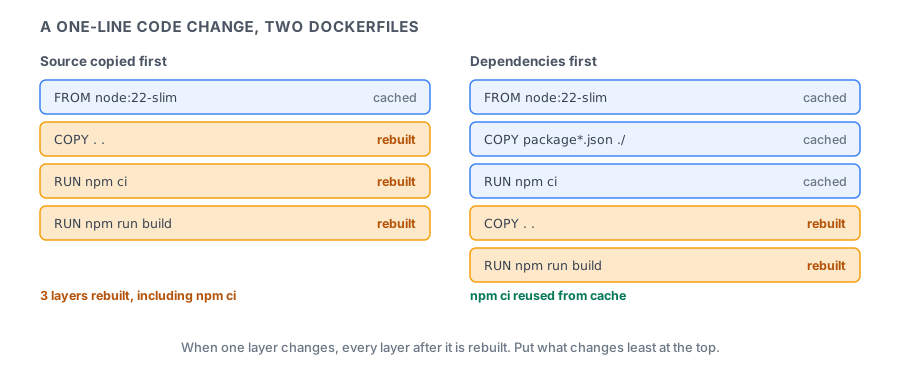
Copy the dependency manifest first (package.json and its lockfile, requirements.txt, go.mod), install dependencies, and only then copy the rest of the source. Code changes many times a day and dependencies change rarely, so the expensive install is reused on almost every build. A .dockerignore file does the rest by keeping node_modules, .git and local build output out of the build context, where they would otherwise invalidate the cache and slow down every build.
Multi-stage builds solve the other common problem: images full of compilers and package managers. An early stage uses a full build image to compile or bundle the application; the final stage starts from a minimal base, such as a slim, distroless or scratch image, and copies in only the output. The toolchain never reaches production, so the image is smaller, pulls faster and gives an attacker far less to work with.
These come up often as quick checks:
COPYvsADD-ADDcan also fetch URLs and unpack archives. PreferCOPYunless you want that behaviour, because it is explicit.- Tags vs digests - a tag such as
node:22can be moved to point at a different image; a digest (@sha256:…) cannot. Pinning base images by digest makes builds reproducible.
What the interviewer is testing: whether you can explain a slow build instead of accepting it. Common follow-up: "The image is 1.5 GB. How do you make it smaller?" A multi-stage build and a minimal base image, then checking which layers are large with docker history.
Area 2: Running containers: processes, networks and volumes
A container is a process with its own view of the filesystem, network and process tree. Most running-container questions come from taking that literally.
PID 1 and signals. docker stop sends SIGTERM to the container's main process and, if it has not exited after a grace period of 10 seconds by default, sends SIGKILL. Graceful shutdown therefore depends on the application receiving that SIGTERM. With the exec form of CMD or ENTRYPOINT (["node", "server.js"]), the application is PID 1 and gets the signal. With the shell form (node server.js), it runs under /bin/sh -c, the shell is PID 1, and the signal may never reach the application, which then gets killed mid-request after the timeout. Kubernetes follows the same sequence when it terminates a Pod, so the question comes up in both contexts.
CMD vs ENTRYPOINT. ENTRYPOINT sets the executable; CMD sets default arguments that are replaced by anything passed to docker run after the image name. Using both gives an image that behaves like a command with overridable defaults.
Networking. Inside a container, localhost means the container itself, not the host, which is why an application that talks to a database on localhost works on a laptop and fails in a container. Containers on the same user-defined bridge network can reach each other by container name through Docker's built-in DNS; on the default bridge network they cannot. EXPOSE only documents a port. Publishing it to the host takes -p host:container.
Data. A container's writable layer disappears with the container. Anything that must survive a restart or redeploy goes into a volume, managed by Docker, or a bind mount of a host directory. Volumes are the default choice for data; bind mounts are handy for development, when you want the container to see source code you are editing on the host.
What the interviewer is testing: treating a container as a process, not a small virtual machine. Common follow-up: "Every deploy drops a few in-flight requests. Why?" Check whether the application receives SIGTERM at all, and whether it stops accepting new work and finishes in-flight requests before the grace period runs out.
Area 3: Container security and the supply chain
This is the area where confident candidates are most often wrong, and the reason is the layer model again.
Deleting a file does not remove it from an image. Each layer is stored separately. If one instruction copies a credentials file and a later one deletes it, the final filesystem does not show the file, but the earlier layer still contains it, and anyone who can pull the image can extract it. The same applies to values passed through ARG or ENV, which are also recorded in the image metadata. Build-time secrets belong in BuildKit secret mounts (RUN --mount=type=secret,...), which are available to one instruction and never written to a layer. Runtime secrets should be injected by the platform from a secret manager.
The rest of the standard hardening list:
- Run as a non-root user. Add a
USERinstruction; a process that escapes as root is a much bigger problem than one that escapes as an unprivileged user. - Minimise the image. Fewer packages means fewer vulnerabilities to scan, patch and explain.
- Scan images in the pipeline for known CVEs and fail the build above an agreed severity.
- Drop capabilities and avoid
--privileged. A privileged container has effectively full access to the host. - Mount only what the container needs.
--read-onlymakes the container's own root filesystem immutable, which is worth doing, but it says nothing about host directories. A container sees a host path only if you bind-mount it, so the list of mounts, and:roon each one that does not need writing, is what actually limits access to the host disk.
Supply chain questions extend the same thinking to everything a build depends on. Base images and dependencies should be pinned, by digest or lockfile. Third-party CI actions and plugins should be pinned to a full commit SHA, not a mutable tag, because a compromised tag silently changes what your pipeline runs. A software bill of materials (SBOM) lists what an image contains, and signing images with a tool such as Sigstore's cosign lets the deploy step verify that an image came from your pipeline and was not replaced along the way.
What the interviewer is testing: whether you know what actually ends up in an artifact and who can read it. Common follow-up: "A developer committed an API key and removed it in the next commit. Are you safe?" No: it is still in history. Rotate the key first, then clean up.
Area 4: CI/CD pipelines people trust
Start with the definitions, because interviewers ask for them precisely:
| Practice | What it means |
|---|---|
| Continuous integration | small changes merged to a shared branch often, each verified by an automated build and tests |
| Continuous delivery | every change that passes is releasable; a person decides when to release |
| Continuous deployment | every change that passes goes to production automatically |
The principle interviewers look for next is build once, promote the same artifact. The pipeline builds one image, tags it with the commit, and deploys that exact image to staging and then to production. Rebuilding for each environment means production runs something that was never tested, because dependencies, base images or build tools may have changed in between. Environment differences belong in configuration injected at deploy time, not in the artifact.
Fast feedback is the property that decides whether a pipeline gets used or worked around. Cheap checks such as linting, type checks and unit tests run first and fail fast; slower integration and end-to-end suites run after them or in parallel. Dependency and layer caches keep builds short. A pipeline that takes forty minutes teaches developers to batch changes, which is exactly what continuous integration exists to prevent.
Quality gates only work if people believe them. A flaky test suite, one that sometimes fails without a code change, trains everyone to press retry, and a gate that is routinely retried is not a gate. Coverage thresholds have a similar trap: a line that ran during a test is not a line whose behaviour was checked, so 100% coverage says nothing about missing assertions or untested edge cases. It is a useful floor, not proof of correctness. For flaky tests, the answer interviewers want is to track them, quarantine them with an owner and a deadline, and fix or delete them, rather than adding automatic retries that turn the pipeline green while hiding the problem.
Secrets in CI have a modern answer too. Long-lived cloud keys stored as pipeline secrets are a standing risk. Most CI platforms can now authenticate to AWS, Azure or GCP through OIDC federation, exchanging a short-lived token for temporary credentials scoped to that pipeline, so there is no static key to leak.
What the interviewer is testing: a pipeline whose artifact you can trust and whose feedback people will actually wait for. Common follow-up: "How do you measure whether delivery is getting better?" The four DORA metrics: deployment frequency, lead time for changes, change failure rate and time to restore service.
Area 5: Deployment strategies and safe rollbacks
A deployment strategy decides how traffic moves from the old version to the new one, and therefore how many users a bad release reaches and how quickly you can undo it.
| Strategy | How it works | Rollback | Cost |
|---|---|---|---|
| Recreate | stop the old version, start the new one | redeploy the old version | downtime |
| Rolling | replace instances a few at a time | roll forward or back gradually | old and new run together |
| Blue-green | deploy to an idle copy, switch all traffic at once | switch back instantly | double capacity during the switch |
| Canary | send a small share of traffic to the new version, widen it while metrics hold | route traffic back | needs good metrics and traffic splitting |
A canary is only as good as its analysis. The point is to compare the new version's error rate and latency with the old version's under the same traffic, and to stop automatically when they diverge, not to let a person glance at a dashboard. Feature flags add a second lever: code can be deployed dark and released to users separately, which turns many rollbacks into switching a flag off.
Strong candidates tend to raise the database before they are asked. Rolling, blue-green and canary all have one thing in common: for some period, the old and new versions of the application run at the same time against the same database. A migration that renames a column breaks the old version the moment it runs, and rolling back the code does not un-rename the column. The standard answer is expand and contract:
- Expand - add the new column or table without removing anything. Both versions still work.
- Migrate - deploy code that writes to both and reads from the new one; backfill existing rows.
- Contract - once no running version uses the old column, remove it in a later release.
Each step is backwards compatible, so any single deploy can be rolled back safely. It takes more releases, and that is the trade-off to state.
What the interviewer is testing: whether your rollback plan still works when the database is involved. Common follow-up: "The canary looks fine but error rates climb after full rollout. What happened?" Usually something that only shows up at full load or on a code path the canary traffic did not exercise, which is why canary steps should run long enough and widen gradually.
A week of DevOps interview practice
Aimed at people who already work near infrastructure. Reading about these steps is easy; the point is to have done each one.
- Day 1 - Layers. Take a Dockerfile you know, change one line of source code, and time the rebuild. Reorder it so dependencies install first and time it again. Then make it multi-stage and compare the image sizes.
- Day 2 - Signals. Run a small server with the shell form and then the exec form of
CMD, rundocker stopon each, and see which one shuts down gracefully. - Day 3 - Secrets. Copy a dummy secret into an image and delete it in the next layer. Extract it with
docker saveand look at the layers. Then rebuild with a BuildKit secret mount and confirm it is gone. - Day 4 - Pipeline. Write a pipeline that lints, tests, builds one image tagged with the commit and pushes it. Add dependency caching and compare the run times.
- Day 5 - Promote. Deploy that same image to two environments with different configuration, and make sure nothing is rebuilt between them.
- Day 6 - Rollouts. Perform a rolling or canary deploy of a version that returns errors, and practise the rollback. Then plan an expand-and-contract migration for renaming a column.
- Day 7 - Rehearse. Explain the path of one change from commit to production out loud in five minutes, naming at each step what can fail and how you would notice.
Next steps
Six questions are only a sample. squizzu's Docker set goes much deeper, with more than 200 reviewed questions across images, builds, networking, volumes, security and troubleshooting, alongside the CI/CD and deployment strategy questions.
Start with the Docker questions on squizzu. The scenario round rewards knowing why the second-best answer fails, and that is what each explanation spells out.
Pipelines have their own set in the CI/CD quiz. Most DevOps loops also include an orchestration round, and Kubernetes interview questions for 2026 covers what happens after the image leaves the pipeline. If your pipeline also runs end-to-end tests, how to prepare for a Playwright interview covers keeping that part of CI fast and honest.