
Two things changed React interviews, and both landed recently enough that advice written even a year earlier is now actively misleading. The React Compiler reached 1.0 in October 2025, which turned "explain useMemo and useCallback" from a recall question into a judgement question. And Server Components, stable since React 19 shipped in December 2024, made the server/client boundary the thing interviewers reach for when they want to find out whether you have actually built something recently.
So the useful way to prepare for a React interview in 2026 is not to grind a list of hook definitions. It is to work the five areas that loops actually test:
- The server/client boundary - what runs where, and what can cross
- Data and forms with React 19 primitives -
use, Actions, Suspense - Rendering in the Compiler era - reconciliation, keys, and when memoization still earns its place
- State and effects - the area that quietly decides live-coding rounds
- The practical rounds - live coding, frontend system design, TypeScript, accessibility
Each section below covers what the area asks and the shape of a strong answer. But before you read any of it, find out where you actually stand.
Start here: a 6-question self-check
Six questions from squizzu's question bank, the same ones you'd meet in the app. They cover one area each, plus a spare: the boundary, React 19 data flow, rendering, effects, and the practical round. No sign-up: pick an answer and you get the explanation plus an in-depth breakdown. The score is not the point; each miss tells you which section below to read properly instead of skimming.

Two of them catch experienced React developers most often. The memoization question does, because the honest 2026 answer is the opposite of the one that was correct in 2023. So does the boundary question, where the trap is that a Server Action can cross while an ordinary callback cannot. The rest map straight onto the sections below: the serialization question is area 1, use() is area 2, memoization and keys are area 3, the stale closure is area 4, and the controlled input is area 5. Whatever you missed, start with that section and read it properly.
What a React loop looks like in 2026
Five rounds, in roughly this order:
- Recruiter screen - your recent work. Whatever you name here seeds the technical rounds, so only mention projects you can defend in detail.
- Technical screen - concepts from the five areas, with follow-ups until you either reach the mechanism or run out of road.
- Coding round - live or take-home, typically 45 to 90 minutes, usually in TypeScript. Build a small component or fix a broken one; algorithm puzzles are rare.
- Frontend system design - "design a data table with sorting, filtering and 100k rows", or "design the front end of a chat app". Component boundaries, state ownership, data fetching, caching.
- Behavioral - a technical disagreement you handled, a decision you would make differently now.
One 2026-specific thing worth settling before you sit down: ask what the policy on AI assistants is. Most companies still prohibit them during technical rounds and will tell you so up front. A few large employers have started piloting the opposite: an assistant is provided, and how you direct, review and correct it is itself part of the score. Walking in with the wrong assumption is an avoidable way to look unprepared.
Area 1: The server/client boundary
This is the highest-signal area in a 2026 React interview, because it is the hardest one to fake. Either you have wrestled with the boundary in a real App Router codebase or you have not, and the follow-ups find out quickly.
The mental model interviewers are checking: a Server Component runs on the server, ships zero JavaScript to the browser, and can read a database or use a secret directly. In exchange it gives up state, effects and event handlers. A Client Component carries the "use client" directive, ships to the browser, and can be interactive. The directive marks an entry point into client-land, not a single file: everything imported from a Client Component becomes part of the client bundle too, which is the detail people miss.
The rule that follows from this is worth being able to derive rather than recite. React renders the server tree, serializes the result (props included), and streams it to the browser. Anything that cannot survive that encoding cannot cross. Data, plain objects, arrays and JSX all serialize. An ordinary function does not, because its body and captured scope have no encoding, which is why passing an inline onClick down from a Server Component is an error rather than a warning. The deliberate exception is a Server Action: mark an async function with "use server" and React sends the client a callable reference instead of the implementation, so the client can invoke it while the code still runs on the server.
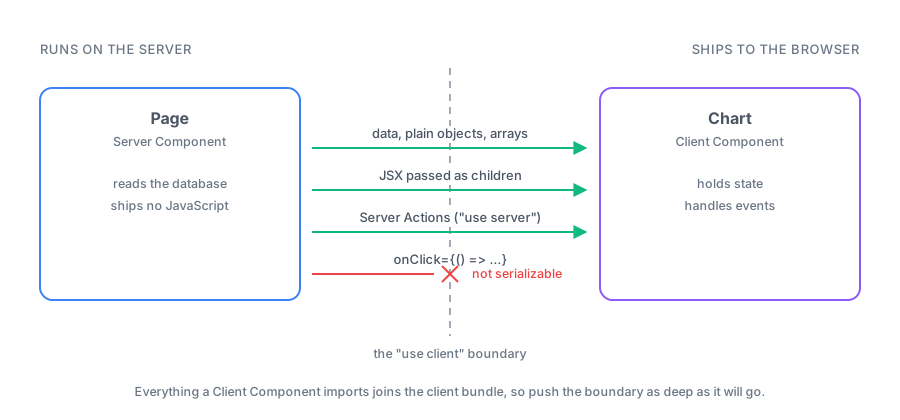
If you can draw that boundary from memory, most follow-ups in this area answer themselves.
Question: What is the difference between a Server Component and a Client Component?
Short answer: Where the code runs and what it is allowed to do. Server Components execute only on the server, add nothing to the client bundle, and can access data sources directly, but they cannot hold state or attach event handlers. Client Components ship to the browser and can do everything interactive. Props passed from a server component into a client component must be serializable.
What the interviewer is testing: Whether you understand this as a boundary with rules, rather than as a rendering optimisation. The tell for a shallow answer is describing Server Components as "server-side rendering with a new name". SSR renders a component on the server and then hydrates it on the client; a Server Component never reaches the client at all.
Common follow-up: You need an interactive chart on a page whose data comes from a database: how do you structure it? (Strong answers keep the page a Server Component that fetches, and pass the data down into a small Client Component that owns only the interactive part. The instinct they want to see is pushing the boundary as deep down the tree as possible.)
Area 2: Data and forms with React 19 primitives
React 19 replaced a stack of hand-rolled patterns with built-ins, and interviewers use them to check how recently you have written data-fetching or form code.
What to be fluent in: use for reading a promise or context, and how it suspends until the promise resolves so the nearest <Suspense> boundary shows the fallback. Actions and useActionState for form submission with pending and error states handled for you. useOptimistic for showing the result before the server confirms it. useFormStatus for a submit button that knows its own form is pending. And ref as an ordinary prop, which retired most forwardRef boilerplate.
Question: How do you show a pending state while a form submits, in React 19?
Short answer: With Actions rather than manual state. Pass an async function as the form's action and React tracks the pending state for you. useActionState gives you the action's return value, an error path and an isPending flag, while useFormStatus lets a nested submit button read its parent form's pending state without prop drilling.
What the interviewer is testing: Whether you still reach for useState plus try/finally out of habit. That code is not wrong, but writing it in 2026 signals you have not touched the modern APIs, and it is materially more code for a worse result.
Common follow-up: Where does useOptimistic fit? (You show the expected outcome immediately and React reconciles it against the real result when the action settles, reverting automatically if it fails. The follow-up behind the follow-up is usually: what happens on failure, and can the user tell?)
Area 3: Rendering in the Compiler era
The classic questions are still asked: what triggers a re-render, why keys matter, what reconciliation does. What changed is the memoization conversation on top of them.
Get the fundamentals exact, because they are easy to fumble under pressure. A component re-renders when its state changes, when its parent re-renders, or when a context it consumes changes. It does not re-render because a prop "looks different". Keys tell React which element in a list is which across renders, which is why using an array index as a key corrupts state when the list reorders. Re-rendering is not the same as touching the DOM: React reconciles first and only commits what actually differs.
Question: Do you still need useMemo and useCallback now that the React Compiler exists?
Short answer: Usually not, and reaching for them by reflex is now the weaker answer. The Compiler memoizes automatically, so the default is to write plain readable code and add manual memoization only where a measurement justifies it. The exceptions are real but narrow: code the Compiler bails out on, cases where a function's identity is part of a contract with a non-React library, and situations where you have profiled and found its heuristics insufficient.
What the interviewer is testing: Whether your knowledge has a date on it. An answer that recites the 2022 rules of thumb is not wrong about mechanics but is wrong about practice, and the follow-up will find that out.
Common follow-up: How would you decide? (The expected shape: profile first with the React DevTools Profiler, find the component that re-renders too often, then fix the cause before adding memoization at all. Usually that cause is state living too high in the tree, or an object created inline in a provider's value.)
Area 4: State and effects
This is where live-coding rounds quietly go wrong. Nobody asks "what is useEffect" any more; they hand you a component that misuses one and watch what you do.
The patterns worth being able to spot instantly:
- Derived state stored in state. A
useStateplus auseEffectthat recomputes it whenever a prop changes should almost always be a plain calculation during render. If it is genuinely expensive, that is the rareuseMemothat survives the Compiler. - Fetching in an effect without cleanup. Two rapid prop changes give you two in-flight requests and the slower one wins. The fix is an
AbortControlleror an ignore flag. In an App Router codebase, the better answer is often to move the fetch to the server entirely. - Stale closures. An effect or callback that closes over the first render's value and never sees the update. Recognising this from a symptom ("it works once, then stops") is a strong senior signal.
- State that lives too high. A value that only one subtree uses, held at the top, re-rendering half the app on every keystroke.
Question: When should you not use an effect?
Short answer: Whenever the work is not synchronisation with something outside React. Transforming data for rendering, responding to a user event, and resetting state when a prop changes all have better answers: compute during render, do it in the handler, or key the component so React remounts it. Effects are for external systems: subscriptions, timers, imperative DOM APIs, non-React widgets.
What the interviewer is testing: Whether you treat effects as an escape hatch or as the default place to put logic. Candidates who default to effects tend to produce components with cascading updates, and interviewers know it.
Common follow-up: How would you reset a form when the selected user changes? (The idiomatic answer is a key on the component so React remounts it with fresh state, not an effect that clears fields.)
Area 5: The practical rounds
The coding round is usually a small, real task in TypeScript: build a searchable list, fix a broken component, add pagination. What is being graded alongside correctness:
- Controlled versus uncontrolled inputs. Know both, know why a controlled input needs
valueplusonChange, and know why switching an input between the two mid-life produces a React warning. - TypeScript fluency at the level the job needs. Typing props and state without hesitating, typing a custom hook's return, knowing when a generic component is worth it. Nobody expects conditional-type gymnastics; everybody notices
any. - Accessibility basics. Label your inputs, use a
<button>for things that are buttons, keep focus visible and manage it when a dialog opens. In a frontend interview, reaching for adivwith anonClickis a small, avoidable ding. - Talking while you work. Silence reads as being stuck. Narrating the trade-off you are weighing is often what turns a pass into a strong pass.
For the system design round, the recurring prompts are a large data table, an autocomplete or search-as-you-type, and a chat or feed. What they want is a component tree with clear ownership, a stated position on where state lives and what fetches it, and awareness of the one hard part in each. That is virtualisation for the table, debouncing and race conditions for autocomplete, and pagination plus optimistic updates for the feed.
A one-week plan built around one project
Reading React does not prepare you to write React under observation. This plan builds one small app and uses it to force each area: a list of records from a database, with a detail page and a form that edits them. If you only have two days, skip the build and run day 4 and day 6 against a codebase you already know well; those two move interview outcomes the most.
- Day 1 - Read the job posting, then set up. The stack in the posting tells you which half of this article matters most: an App Router shop will push hard on area 1, a long-lived SPA on areas 3 and 4. Scaffold the app and get the list rendering from a real data source in a Server Component.
- Day 2 - Add the form. Do it with an Action and
useActionState, then adduseOptimistic. Feel where the boundary sits, and try to push"use client"one level deeper than your first instinct. - Day 3 - Make it slow, then fix it. Render a few thousand rows, open the Profiler, find what re-renders and why. Fix the cause before adding memoization, then check what the Compiler was already doing for you.
- Day 4 - Audit the effects. Go through every
useEffectyou have written and ask whether it synchronises with something outside React. Delete the ones that do not. Then do the same in a work codebase. The examples you find there are the ones worth telling an interviewer about. - Day 5 - TypeScript and accessibility pass. Remove every
any, type the hooks properly, then navigate the whole app with only the keyboard and fix what you cannot reach. - Day 6 - Answer out loud. Take the questions from the sections above and say the answers to an empty room, in under two minutes each: definition, mechanism, trade-off, example. Knowing something and producing it under pressure are different skills.
- Day 7 - Close the gaps. Revisit whatever the self-check at the top and day 6 exposed, and prepare a few questions of your own. Asking whether they have adopted the Compiler, or what their server/client split looks like in practice, lands better than most answers do.
How ready are you?
The self-check at the top gave you six data points in about five minutes. The rest of the React set works the same way: commit to an answer, then read why it was right or wrong.
Test yourself on the full React question set on squizzu. Every question carries an explanation and an in-depth breakdown, so each miss turns into something you can close before the interview.
Working through the Next.js side of the stack too? The Next.js quiz covers the App Router conventions that come up in the same loops.