
AI arrived in software testing as tooling rather than as a replacement, and the tooling is genuinely good. Locators heal themselves, suites generate in seconds, models predict which modules will break, and telemetry raises its own alarms. Interviews adjusted accordingly. Nobody spends a round asking whether you use these things.
What they ask instead follows from a single observation: every one of these capabilities has a failure mode that looks like success. A healed locator turns a real regression green. A generated suite reaches 95% coverage while asserting almost nothing. A load generator reports a flattering p99 by never sending the requests that would have been slow. The tools do not fail loudly; they fail quietly, in the direction of a passing build.
So the useful preparation for AI in software testing interview questions in 2026 is not a tour of vendors. Five areas carry the signal:
- Where AI actually fits - and the part of testing it does not touch
- Generated tests - coverage, assertions, and who wrote the oracle
- Self-healing and visual automation - the two techniques most likely to hide a bug
- Defect intelligence and test selection - models that shape where you look
- Non-functional and test data - load numbers that lie, and data you are allowed to use
Each one below explains how the tool works, what it conceals, and the answer that lands in a room. You will not need all five equally, so measure first.
Start here: a 6-question self-check
Six questions drawn from squizzu's AI-in-QA set, one per area with a second on UI automation. Pick an answer and the reasoning opens, followed by a deeper breakdown. No account needed. Treat a wrong answer as a pointer rather than a grade, since it names the section you should not skim.

Notice what most of them have in common. In nearly every case the tool reported success and quality went down anyway. That shape is the whole subject, and if it surprised you in more than one place, read on rather than skimming.
What an AI in software testing interview actually tests
Three conversations recur.
The tooling conversation. Which of these have you used, and what did they change about your workflow? This is the warm-up, and answering it with a feature list is the first way candidates lose ground.
The failure-mode round. Here is a situation where the tool said everything was fine and it was not. What happened? This is where the spread between candidates is widest, and it is unfaked: you either have been burned or you have not.
The metrics conversation. How do you know the tooling is helping? Almost everyone can name a metric. Far fewer can explain why the obvious metric gets gamed.
The pattern across all three is that the tools are assumed and the judgement is examined. That reflects what actually changed about the job.
Area 1: Where AI actually fits in QA
Start with the limit, because it explains the shape of everything else.
Generating test inputs is cheap. Knowing what output each input should produce is not. That second half is the oracle problem, and it is unmoved by better models. A generator can produce ten thousand inputs for a pricing function in seconds and still have no idea what any of them should return. Anyone who has watched a demo and concluded that testing is now solved has not met this distinction.
What AI genuinely does across the QA process is narrower and still valuable:
- Generation - inputs, scaffolding, edge-case suggestions, test data
- Defect intelligence - predicting risky modules, triaging incoming reports, clustering duplicate crashes
- Optimization - selecting and ordering which tests run for a given change
- Interface automation - healing locators, comparing screenshots
- Signal extraction - surfacing the anomalous lines in a two-hundred-thousand-line log
What stays human is deciding what correct means, judging risk, and deciding when testing is sufficient to release.
Which leads to the failure mode that defines this area. A tool that is usually right is more dangerous than one that is usually wrong, because people stop checking it. This is automation bias, documented long before AI in the human-factors literature, and it has two halves that are worth naming separately. Errors of commission are acting on a wrong recommendation. Errors of omission are assuming that whatever the tool did not flag must be fine. Deadline pressure amplifies both.
The corrective is not distrust, since under-trusting a good tool wastes it. It is calibration: know the tool's measured false-positive and false-negative rates, treat its output as candidates rather than verdicts, and keep looking for the problems it does not raise. A team that can quote its own tool's precision is a team that has thought about this.
One more question surfaces here, usually near the end. When an AI tool makes the pass/fail call and a defect reaches customers, who is accountable? The tool cannot be. Answers that locate accountability with the team that chose to rely on it, and that describe the review gate they kept, land better than answers about vendor SLAs.
Area 2: Generated tests
Test generation is where the value is most obvious and the trap is most common.
Coverage is not the goal, and generating until coverage hits a target is an anti-pattern. Line coverage records which statements executed. It says nothing about whether anything was checked. A suite can execute 95% of a codebase while its assertions would pass against nearly any output, which is a slower, more expensive way of running the code than simply running it.
The gap is easiest to see by breaking the code on purpose:
// Generated test. Line coverage on shippingCost() reads 100%.
test('calculates shipping', () => {
  const result = shippingCost({ weight: 2, country: 'PL' });
  expect(result).toBeDefined();   // true for 0, -1, NaN, {} ...
});

// Now gut the implementation:
function shippingCost() { return 0; }   // every rule ignored

// The test still passes. Coverage still reads 100%.
The check that answers the real question is mutation testing: deliberately introduce faults, then see whether the suite goes red. A generated suite that survives mutation is doing work; one that does not is decoration with a coverage badge. Its limit is worth knowing too, since it is slow and its mutants are not real bugs, but no other technique answers the question as directly.
Then the subtler problem, and the one interviewers reach for when they want depth. When the same model writes the implementation and its tests in one pass, the tests lose their independence. A test is useful precisely because it is a second opinion the code has to satisfy. If both come from one interpretation of the requirement, a misunderstanding lands in both, and the test asserts exactly what the buggy code does. Everything passes. Nothing was verified.
Passing tests written alongside the code prove consistency, not correctness. They are a real regression net going forward, and they cannot catch a wrong intent, because they share it. Restoring independence is what the mitigations have in common: derive some tests from the specification rather than from the code, have a person review them against intended behaviour, compare against a reference implementation, or use metamorphic relations that must hold whatever the implementation does.
Two smaller things come up reliably. Generated tests reference methods that do not exist, so the first gate is simply whether the thing compiles and runs. And characterization tests, where a generator captures current behaviour as the expected value to protect a refactor, quietly encode whatever bugs the code has today.
Finally, watch the shape of what gets generated. When end-to-end tests become nearly free to produce, teams generate thousands of them and few unit tests, and end up with the inverted pyramid: a slow, flaky suite that is expensive to diagnose. The cost of a test did not disappear, it moved from writing to running and maintaining.
Area 3: Self-healing and visual automation
These two techniques do more to keep a suite green than anything else in the category, which is exactly why they deserve the most suspicion.
Self-healing trades brittleness for something worse than brittleness. When a locator breaks, the tool re-finds the element from secondary signals: its text, its role, its neighbours, its position. That is what lets a suite survive a renamed CSS class, and it is a real saving.
But those same heuristics do not know the difference between a cosmetic change and a meaningful one. If a release moves a Delete button into the position Cancel used to occupy, the tool can heal onto it, the test clicks Delete, and the run goes green while a destructive bug ships. The brittleness that self-healing removed was, in part, a useful alarm.
The mitigation has two halves and a good answer gives both. Every heal is a signal that the UI changed, so heals should be surfaced and reviewed rather than silently applied. And tests should assert on outcomes, not merely on having found something to click, because asserting that the record still exists afterwards is what exposes a heal onto the wrong control. Anchoring on stable test ids also leaves healing less room to wander.
Visual testing has the same shape in a different costume. A visual test proves that the page matches its approved baseline. It has no independent notion of what the page should look like, because no pixel comparison contains design judgement. That makes it a characterization test: the baseline is the oracle, and it records whatever a human approved.
The consequence is uncomfortable. If a misaligned button was captured and approved, the test passes on the bug indefinitely, and the day someone fixes the alignment the test fails. A green visual test means unchanged, not correct. Baseline approval is the actual quality gate, and treating baseline updates as a mechanical accept-current-screenshot step is how a defect becomes permanent.
Tolerance tuning is the related trap. Set the pixel threshold tight and anti-aliasing noise makes the suite unusable. Set it loose to stop the noise and a genuine layout regression slips under it months later. The better fixes are structural rather than numerical:
// Instead of raising the pixel threshold until the noise stops:
await page.clock.setFixedTime(new Date('2026-01-01T09:00:00Z'));
await page.route('**/ads/**', route => route.abort());
await page.addStyleTag({ content: `*, *::before, *::after {
  animation: none !important; transition: none !important;
}` });

await expect(page).toHaveScreenshot('dashboard.png');
Each line removes a source of variance instead of widening the tolerance that would have caught it. Where the check can be made on semantics rather than pixels, that is better still.
Area 4: Defect intelligence and test selection
This area is about models that decide where you look, which makes their biases unusually consequential.
The capabilities are real. Defect prediction flags which modules are likely to contain bugs from churn and history. Test selection runs only the tests a change could affect, turning a three-hour suite into a three-minute one. Triage models route incoming reports and predict severity. Clustering collapses a million crashes into a handful of distinct signatures. Log anomaly detection surfaces the few lines that explain a failure.
The interview interest is in what goes wrong, and three things go wrong repeatedly.
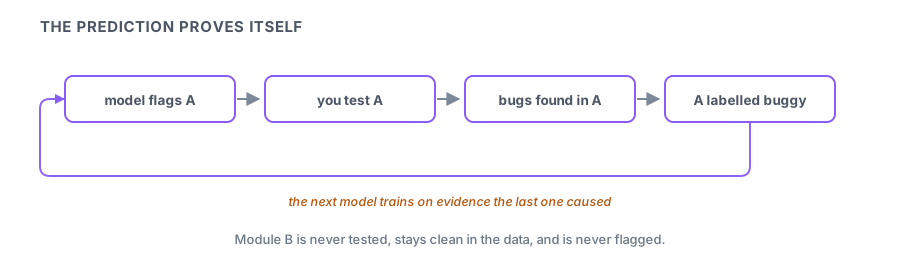
The feedback loop. If you test only where the model points, you find bugs mostly where the model pointed, and that becomes the training data for the next model. The prediction confirms itself while the unexamined parts of the codebase go quietly untested. Any answer about defect prediction that does not mention keeping some exploration outside the model's recommendations is incomplete.
The gamed metric. Churn predicts defects, so rewarding teams for reducing churn looks reasonable, and it works: churn falls. Defects do not, because the correlation was never the cause. Once a measure becomes a target it stops measuring what it did, and QA metrics are unusually easy to game, since a suite can be made green by weakening it.
Actionability. A defect-prediction model can be accurate and still useless if it flags the large old files everyone already knows are complex without saying what to do about them. Developers ignore it, and the accuracy was never the problem.
Two measurement points come up alongside these. Because only a small fraction of files contain defects, accuracy is a meaningless metric for defect prediction; a model that labels everything clean scores well and predicts nothing. And a test-selection model trained on historical pass and fail data learns from failures that were often flaky rather than real, so it learns to predict noise.
Area 5: Non-functional and test data
The last area is where numbers look most authoritative and are most often wrong.
Load testing. The natural way to write a load generator is to issue one request, block until it answers, and repeat. That single design decision makes the tail meaningless. When the system stalls for a second, the generator blocks on its one in-flight request and issues nothing further. A real workload would have sent hundreds of requests during that second and every one of them would have been slow. Those requests never exist in your dataset, so the p99 is computed from samples that exclude precisely the bad moments.
This is coordinated omission, and it is a leading reason load numbers look fine in staging and fall apart in production.
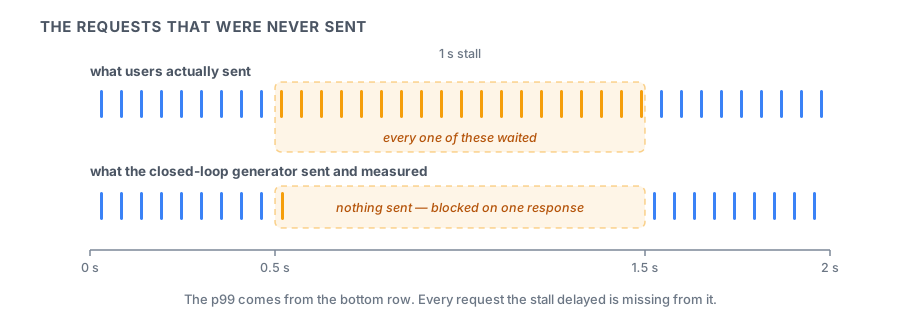 The fixes are to generate load open-loop, on a fixed schedule regardless of whether responses have returned, or to correct for the omission afterwards, which is what HdrHistogram's correction does. There is a legitimate use for the closed loop, since it does model a fixed set of users who pause between actions. What it cannot do is produce percentiles anyone should quote without correcting them first.
Two related traps sit next to it. Percentiles do not average, so taking the mean of per-minute p99s over an hour produces a number that describes nothing. And a service whose own p99 is respectable becomes a slow request when a single user action fans out across a hundred such services, because the chance of hitting at least one tail grows with the fan-out.
Test data is the other half of this area, and its tension is straightforward. Synthetic data is more useful the closer it resembles production, and more dangerous for exactly the same reason, since fidelity is what makes records re-identifiable. Removing names is not anonymisation when a postcode, a birth date and a gender identify someone uniquely. And a naive subset of production data breaks the moment it violates referential integrity, when the orders you copied point at customers you did not.
Anomaly detection closes the loop. A detector that does not model seasonality fires every Monday morning when traffic rises normally, and a team that has learned to dismiss its alerts is no better off than one with no detector at all.
A week of evenings
Written for someone already working in QA who has touched at least a few of these tools.
- Day 1 - Name the limit. Write out the oracle problem in your own words, then list five things AI does in your pipeline and mark which ones touch it. Nothing should.
- Day 2 - Mutate something. Run mutation testing against a suite you trust. The surviving mutants are the honest measure of what your tests are worth, and the number usually surprises people.
- Day 3 - Generate and audit. Have a tool generate tests for a function you know well, then read only the assertions. Count how many would pass against a deliberately wrong implementation.
- Day 4 - Review the heals. Find every self-healed locator in your suite from the last month and check what changed in the UI each time. If your tool does not surface heals, that is the finding.
- Day 5 - Break a baseline. Approve a visual baseline containing a deliberate flaw and watch the suite pass. Then work out what assertion would have caught it.
- Day 6 - Measure the tail properly. Run a load test closed-loop, inject a stall, and look at the p99. Repeat open-loop. The difference between the two numbers is the story you will tell in the interview.
- Day 7 - Say it out loud. Two minutes per area: what the tool does, what it hides, how you would catch it, and an example from the week. Then decide what you want to ask them. "Who reviews your self-healed locators?" separates teams that have thought about this from teams that bought a licence.
How ready are you?
The self-check gave you six data points. The full AI-in-QA set has 300, spread across all five areas and then some.
Work through the AI Testing questions on squizzu. Every answer opens into the reasoning behind it, which is how a vague worry turns into something specific enough to fix.
AI testing sits on top of a stack that interviews still probe directly. The CI/CD quiz covers the pipeline these suites run in, and the ML fundamentals quiz covers the models behind defect prediction and anomaly detection.
If the role leans on the framework rather than the layer above it, Playwright interview questions covers auto-waiting, strict mode and flake. And from the developer's side of the same pipeline, AI coding interviews in 2026 covers reviewing what an agent produces, tests included.